Crawl Budget Optimization: How to Make Googlebot Prioritize Your Best Pages in 2026
Published: 2026-10-12 Updated: 2026-10-12 9 min read By Abdullah Saleh
Share this Guide / ToolHelp colleagues & business owners scale their organic rankings
Key Takeaway
Crawl budget determines how often and how deeply Googlebot crawls your website. This expert guide explains how to optimize crawl budget allocation so Google spends maximum crawl time on your highest-value pages, leading to faster indexation and stronger rankings.
Crawl budget determines how often and how deeply Googlebot crawls your website. This expert guide explains how to optimize crawl budget allocation so Google spends maximum crawl time on your highest-value pages, leading to faster indexation and stronger rankings.
✅ Key Takeaways — crawl budget optimization
Crawl budget matters most for large sites — small sites under 1,000 pages rarely need to prioritize this
Parameterized URLs are the #1 crawl budget killer for e-commerce sites — block or canonical them immediately
Improving server TTFB to under 200ms is the fastest way to increase your crawl rate limit
Monitor Crawl Stats in Google Search Console monthly — sudden crawl volume drops indicate server or technical issues
All 301 redirect chains must resolve in a single hop — multi-hop chains waste budget and dilute PageRank
Crawl budget is the number of pages Googlebot crawls on your site within a given timeframe — determined by your server response speed (Crawl Rate Limit) and how valuable Google considers your content (Crawl Demand). Large sites with unmanaged parameterized URLs, redirect chains, and 404 errors can waste 50–70% of crawl budget on low-value pages, severely delaying the indexation of priority content.
1. What Is Crawl Budget and Why Does It Matter for Large Websites?
Crawl budget is the number of pages Googlebot will crawl on your website within a given time period. For small websites (under 1,000 pages), crawl budget is rarely a limiting factor — Google will crawl all pages regularly. However, for large e-commerce sites, news publishers, SaaS platforms, and enterprise websites with thousands or millions of URLs, crawl budget becomes a critical performance constraint that directly affects how quickly new or updated content is discovered, indexed, and ranked.
The practical consequence of crawl budget exhaustion is delayed indexation: when Google's crawl allocation is consumed by low-value pages (error pages, thin duplicate content, parameterized filter URLs), the high-value pages you actually want to rank — new product pages, fresh blog posts, updated service pages — may not be crawled for days or weeks. In fast-moving industries where content freshness is a ranking signal, this delay can cost significant organic visibility.
2. The Two Components of Crawl Budget: Crawl Rate Limit vs. Crawl Demand
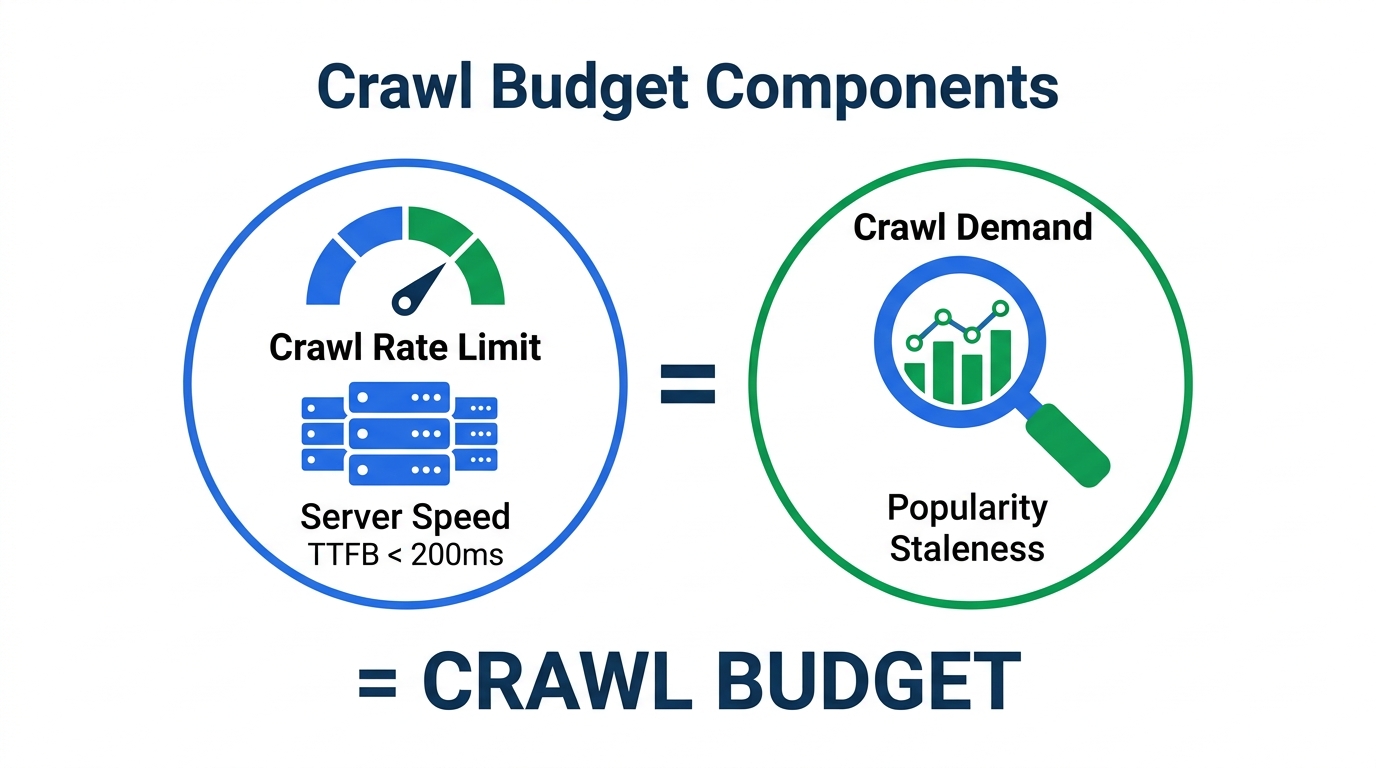
Google defines crawl budget as the product of two factors: Crawl Rate Limit and Crawl Demand. Crawl Rate Limit is the maximum number of simultaneous connections Googlebot will use to crawl your site — determined primarily by your server's response capacity. If your server slows down under load, Googlebot automatically reduces its crawl rate to avoid overwhelming it. Optimizing server response time (TTFB under 200ms is ideal) is the most direct way to increase your crawl rate limit.
Crawl Demand is Google's assessment of how valuable it is to crawl your site, based on two sub-signals: Popularity (sites with more backlinks and traffic are crawled more frequently because they are considered more important to users) and Staleness (pages that Google suspects have been updated receive priority crawl allocation to ensure the index reflects current content). Understanding these two factors reveals why improving your site's authority and publishing fresh content both have secondary benefits for crawl efficiency.
Crawl Budget = Crawl Rate Limit × Crawl Demand — understanding both components is essential for optimization.
Monitor your current crawl rate using our Robots.txt & Sitemap Builder to ensure Googlebot can efficiently discover all your sitemap URLs.
3. How to Identify Crawl Budget Waste: Log File Analysis Step-by-Step
Log file analysis is the most precise method for diagnosing crawl budget waste. Server access logs record every HTTP request from every crawler, including Googlebot, with timestamps, URL paths, response codes, and response times. By filtering logs for 'Googlebot' user agent and analyzing which URLs are being crawled, how frequently, and what response codes they return, you can identify exactly where crawl budget is being wasted.
Common crawl waste patterns revealed by log file analysis include: Googlebot spending 30–60% of crawl time on URL parameters (e.g., /products?color=red&size=M), redirect chains consuming crawl budget without delivering indexable content, repeated crawls of 404 error pages that were not fixed, and crawling of low-value admin, staging, or development URL patterns. Once identified, each waste category has a specific technical remedy.
Use Screaming Frog Log File Analyser or JetOctopus for advanced log file analysis. For a quick crawl efficiency assessment, our HTTP & SSL Header Checker identifies response code issues that are likely consuming crawl budget.
4. 10 Proven Crawl Budget Optimization Techniques for 2026
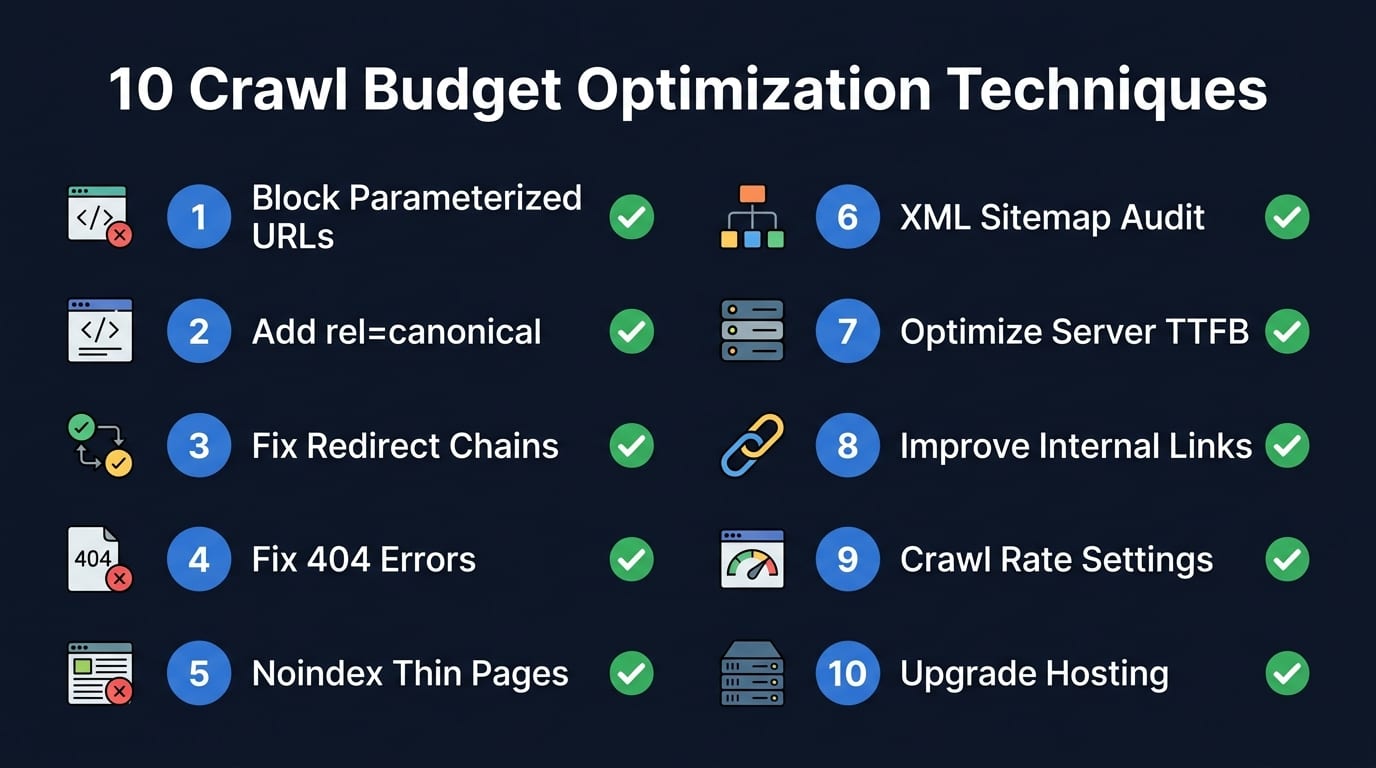
The 10 most effective crawl budget optimization techniques for 2026 are: (1) Block parameterized URLs in robots.txt or use URL parameter handling in Search Console; (2) Implement rel='canonical' on all duplicate and near-duplicate pages to concentrate crawl allocation; (3) Reduce redirect chains — ensure all 301 redirects resolve in a single hop; (4) Fix all 404 errors and update internal links pointing to them; (5) Remove or noindex thin, duplicate, and low-quality pages; (6) Implement a strong XML sitemap with only indexable, canonical URLs; (7) Optimize server response time to below 200ms TTFB; (8) Improve internal linking depth so all priority pages are within 3 clicks from homepage; (9) Use Crawl Rate Settings in Google Search Console to signal preferred crawl timing; (10) Upgrade hosting infrastructure if server-side capacity is limiting crawl rate.
All 10 crawl budget optimization techniques — implement in order of priority for fastest impact.
Among these, fixing 404 errors and removing redirect chains typically produce the fastest crawl budget improvements — both can be implemented within days and show results in Search Console's crawl stats report within 1–2 weeks. Parameterized URL management often requires the most planning but delivers the largest long-term crawl efficiency gains for e-commerce sites.
Our Technical SEO team implements all 10 crawl budget optimization techniques as part of our comprehensive technical audit and remediation service.
The three most common crawl budget killers on large websites are parameterized URLs, redirect chains, and infinite pagination. Parameterized URLs — URLs generated by filters, sorting, search queries, and session IDs — can multiply a 10,000-page e-commerce site into 1,000,000+ unique URLs. Google wastes enormous crawl budget attempting to evaluate each parameterized combination rather than focusing on canonical product and category pages. The solution is to either block parameter patterns in robots.txt, use rel=canonical pointing to clean URLs, or configure parameter handling in Google Search Console.
Redirect chains occur when a 301 redirect points to another URL that also redirects — creating a chain of A→B→C instead of a direct A→C redirect. Each hop in a redirect chain consumes crawl budget and dilutes the PageRank (link equity) passed through the redirect. Googlebot typically follows up to 5 redirect hops, but chains longer than 2 hops significantly reduce crawl efficiency. Audit and flatten all redirect chains to single-hop 301 redirects.
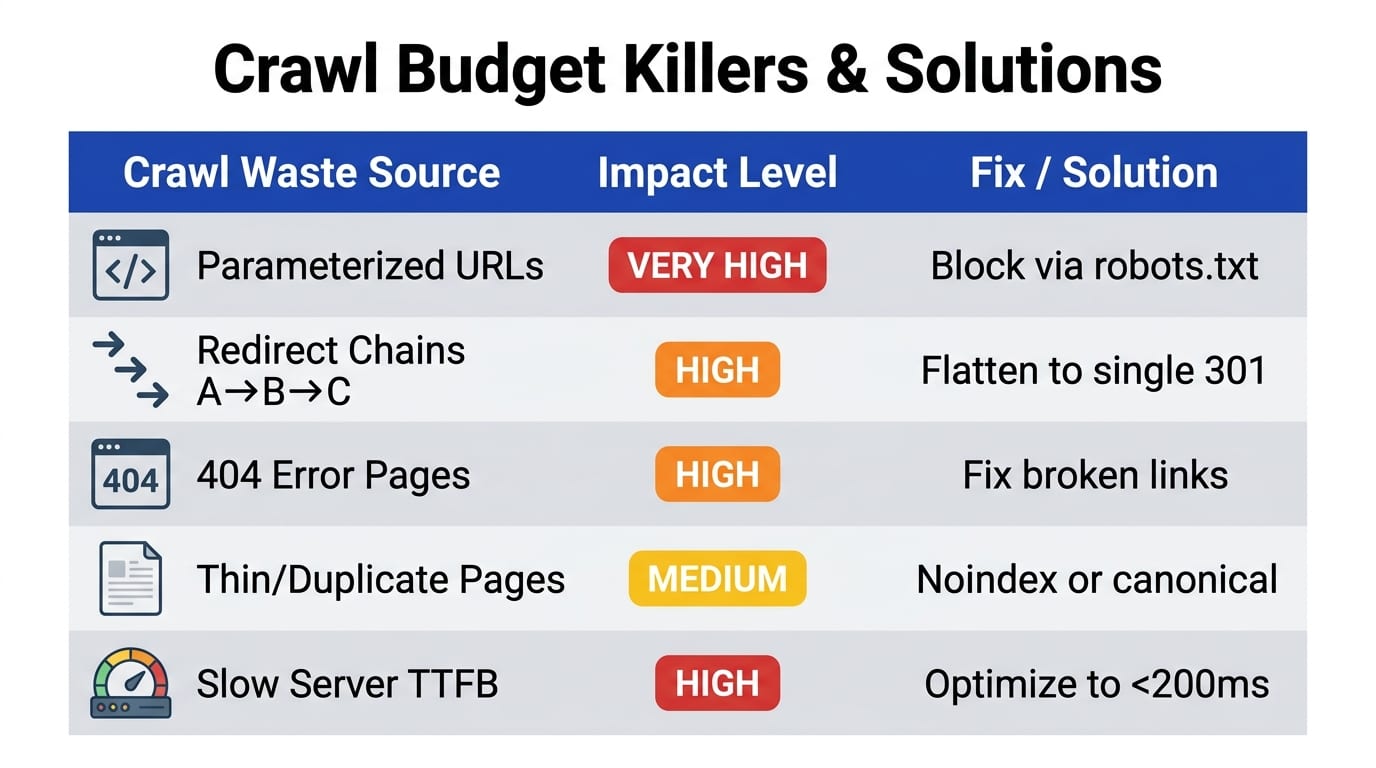
Common crawl budget killers ranked by impact level with specific remediation steps for each.
Generate and audit your XML sitemap to ensure it contains only canonical, indexable URLs using our Robots.txt & Sitemap Builder.
6. Monitoring Crawl Budget Health With Google Search Console & Server Logs
Google Search Console provides two critical reports for ongoing crawl budget monitoring: the Crawl Stats report and the Page Indexing report. The Crawl Stats report shows total crawl requests per day, average response time, and breakdown by response code — watch for sudden drops in daily crawl volume (indicating server issues) or spikes in 4xx/5xx response codes (indicating broken pages consuming crawl allocation). The Page Indexing report shows which pages are indexed versus excluded and the specific reason for each exclusion.
Set up a monthly crawl budget monitoring routine: export and compare Crawl Stats data month-over-month; review the top 20 most-crawled URLs and confirm they are your highest-value pages; check for new crawl errors in the Coverage report; and review your sitemap's indexed-vs-submitted ratio — a ratio below 80% indicates significant crawl waste or indexation issues. Investigate and resolve any ratio below 70% immediately.
For ongoing technical monitoring and performance tracking, our Technical SEO Service includes monthly crawl budget reports and proactive issue resolution. Use our Free Audit Tool for a quick crawl health check anytime.
Comparative Analysis: Impact vs. Solution
Crawl Waste Source
Impact
Solution
Parameterized URLs
Very High — can multiply URLs 100x
Robots.txt blocking or URL parameter handling in GSC
Redirect Chains (A→B→C)
High — wastes budget per hop
Flatten all chains to direct single-hop 301 redirects
404 Error Pages
High — repeated crawls of dead URLs
Fix 404s, update internal links, return 410 for gone pages
Thin/Duplicate Pages
Medium — dilutes priority crawls
Noindex or canonical consolidation to canonical URL
Slow Server Response
High — reduces crawl rate limit
Optimize TTFB to < 200ms; upgrade hosting if needed
Actionable Implementation Roadmap for crawl budget optimization
Crawl Audit: Run our Free SEO Audit to identify indexation errors and crawl efficiency issues across your site.
Sitemap Audit: Review your XML sitemap using our Robots & Sitemap Builder. Ensure it only contains canonical, indexable URLs.
Parameter URL Handling: Identify all parameterized URL patterns in your server logs. Implement robots.txt blocking for low-value parameter combinations.
Redirect Chain Flattening: Export all redirects from your server configuration. Flatten any chain longer than 1 hop to a direct 301 redirect.
Server Performance Optimization: Measure TTFB with our HTTP Header Checker. Target TTFB under 200ms through caching, CDN, and server-side optimization.
Crawl budget is the number of pages Googlebot will crawl on your website within a given time period, determined by your server's response capacity (Crawl Rate Limit) and Google's assessment of your site's content value and freshness (Crawl Demand).
Q2: Does crawl budget matter for small websites?
For websites under 1,000 pages, crawl budget is rarely a limiting factor — Google typically crawls all pages of small sites regularly. Crawl budget optimization becomes critical for large sites with 10,000+ URLs, e-commerce sites with parameterized filter URLs, or sites with frequent content updates requiring rapid indexation.
Q3: How do I check my site's crawl budget?
Use Google Search Console's Crawl Stats report (under Settings > Crawl Stats) to view daily crawl volume, average response time, and response code breakdowns. For deeper analysis, review your server access logs filtered by Googlebot user agent.
Q4: Does page speed affect crawl budget?
Yes — server response time directly affects your Crawl Rate Limit. Sites with TTFB (Time to First Byte) under 200ms receive significantly higher crawl frequency than slow sites. Google reduces crawl rate on slow servers to avoid causing performance issues.
Q5: How do parameterized URLs affect crawl budget?
Parameterized URLs (generated by filters, sorting, and search parameters) can multiply a site's URL count by 10–1000x, causing Googlebot to waste enormous crawl budget on low-value, duplicate, or thin content pages rather than focusing on canonical product and category pages.
Ready to Accelerate Rankings for crawl budget optimization?
Partner with Abdullah Saleh — Lead SEO Strategist & AI Search Architect — to build an organic growth engine that delivers sustainable results.
Abdullah Saleh is an Organic Business Growth Specialist and Technical SEO Expert helping global brands achieve authoritative rankings and citations across Google Search, Google AI Overviews, ChatGPT Search, and Perplexity AI.
A practical, diagnostic guide to Google Search Console mastery. Learn how to isolate server errors, resolve soft 404s, unclog crawl bottlenecks, and scale your search impressions.
A complete 50-point technical SEO checklist for 2026. Audit crawlability, Core Web Vitals, mobile usability, schemas, and AI search readiness for top rankings.
Local SEO Bangladesh is the fastest way for local businesses to capture high-intent customers actively searching for your services in Dhaka, Chittagong, and across Bangladesh. This complete 2026 guide covers Google Maps optimization, Local Pack ranking, and Google Business Profile tactics.
Join Our Newsletter for Weekly SEO Trends and Algorithm Updates




 Technical SEO